


Kia Access
4.712.30K Reviews
App Specs
- Version
- Varies with Device
- Updated On
- License
- Free
- Downloads
- 1,000,000+
- Developer
- Kia America
- Categories
- Productivity
- Platform
- Android, iOS
Screenshots
 Analysis by AppCompare
I found Kia Access most useful when I treated it as a practical companion to owning a Kia, rather than as a general car-management app. Its purpose is straightforward: it brings vehicle information into one place so I do not have to search through paperwork, remember separate service details, or rely on a dealership visit for every small question. That focus is also its biggest strength. It does not try to be a universal driving platform; it is a brand-specific productivity app from Kia America.
After spending time with it, my view is simple: Kia Access is worth installing if you own a compatible Kia and want a more convenient way to stay connected to vehicle information. It is free, rated for Everyone, and has built a substantial audience, with more than a million installs and an average rating of 4.7 from roughly ninety-eight thousand ratings. Those figures do not make it perfect, but they do suggest that the basic idea works well for many owners.
What Kia Access actually improves in daily ownership
The most valuable change is not one flashy feature. It is the reduction of small bits of friction that accumulate around a car. Vehicle information tends to be scattered between the glove compartment, email, dealership conversations, maintenance receipts, and memory. An app designed around Kia ownership gives those details a more natural home.
I especially appreciate this on ordinary days rather than during dramatic situations. Before leaving for work, I can use the app as a quick reference instead of opening a browser and trying to identify the right Kia page for my vehicle. When planning a service visit, having vehicle-related information close at hand makes the preparation feel less improvised. The benefit is modest each time, but it becomes noticeable over weeks of ownership.
The app also makes sense for people who share responsibility for a vehicle. A household may have one person who normally handles appointments and another who drives most of the time. Keeping the ownership experience tied to an app can make those handoffs easier, especially when someone needs to check vehicle information while away from home.
That does not mean every task becomes automatic. Kia Access is still an ownership tool, not a replacement for reading the vehicle documentation or speaking with a qualified service professional when something serious is happening. I would use it to organize and access information, then use proper professional help for mechanical decisions that require inspection.
The strongest part is the brand-specific focus
Many automotive apps try to cover every manufacturer and every kind of driver. That broad approach can be convenient, but it often leaves the user sorting through generic menus and translating general advice to a particular vehicle. Kia Access starts from the opposite direction. It is built by Kia America for Kia owners, so the experience feels more relevant when I am dealing with a Kia-specific question or ownership task.
Worth Reading Before You Choose

EA SPORTS FC Mobile 26 Is a Bigger Football Game, but It Takes Time

Flipboard Shows What News Apps Must Do Beyond the Feed

Switching to Android Auto Means Rethinking Your Driving Routine

Google Calendar Makes a Crowded Week Easier to Manage

Ludo King Makes the Most of the Minutes Between Plans

Baby Panda World Brings Quick Play to Modern Phones, but Its Game Library Feels Busy
This focus is particularly helpful for newer owners who are still learning where everything belongs. A general notes app can store an appointment reminder, and a web search can find a manual, but neither creates the same sense of a dedicated ownership hub. Instead of assembling my own system from unrelated tools, I can begin with an app that understands the context of the vehicle brand.
There is also a psychological advantage. When an app is clearly associated with the manufacturer, I am more likely to check it before turning to random search results. That matters because automotive information online can vary in quality, and a result that looks relevant may apply to a different model, trim, or market. A manufacturer-focused starting point reduces that particular kind of confusion.
A realistic everyday workflow
Imagine a weekday morning when I notice that it is time to think about vehicle maintenance, but I am already late for work. I do not want to dig through a folder in the house or call a dealership just to begin organizing the next step. I open Kia Access, check the vehicle-related information available there, and make a note of what I need to ask when arranging service.
Later, while sitting at my desk, I can return to the same place and finish the task without reconstructing the entire situation. That two-stage workflow is more realistic than pretending car ownership happens in one uninterrupted session. The app is useful because it supports quick checks first and more deliberate planning later.
A second example is preparing for a trip. I might want to confirm details about the vehicle before leaving, especially if another family member will drive. Rather than relying on memory, I can use the app as part of my preparation routine. It does not remove the need for sensible checks such as fuel, tires, lights, and emergency supplies, but it can make the information side of preparation less scattered.
One less obvious benefit is continuity. When vehicle information is kept in a dedicated place, it becomes easier to build a habit around checking it. The app is not valuable only when something goes wrong; it can also support a calmer routine in which maintenance and ownership details are handled before they become urgent.
Useful for organization, but not a mechanical diagnosis tool
I think users get the best results when they define the app's role correctly. Kia Access can help me stay oriented as an owner, but I would not treat it as a diagnostic authority. If a warning light appears, the app may be a sensible first stop for information, yet it should not replace the vehicle's own warnings, the owner's manual, or a technician's assessment.
This distinction is important because a polished app can create a false feeling that every car problem has a simple digital answer. Cars remain physical machines. A phone can improve access to information and make communication easier, but it cannot inspect a brake component, hear an unusual engine noise in person, or guarantee that a vehicle is safe to drive.
For me, that is not a flaw unique to Kia Access. It is a boundary that should shape expectations. The app works best as the information and organization layer around ownership, not as a substitute for maintenance expertise.
Where the experience can feel limited
The same brand-specific design that makes Kia Access relevant also narrows its usefulness. If I regularly drive several brands, manage a household with multiple manufacturers, or want one dashboard for every vehicle, a broader automotive service may fit better. Kia Access makes the most sense when a Kia is central to the task.
There is also a practical limitation in depending on a dedicated app for information I may use only occasionally. Some owners will prefer a paper manual, a calendar reminder, or a direct dealership relationship. If I already have a system that works and rarely need to check vehicle details, installing another app may not feel necessary. The convenience becomes more persuasive when I actually want a single digital place for Kia-related ownership matters.
I would also avoid assuming that the app removes every step from a service process. Digital access can help me prepare, but appointments, inspections, repairs, and decisions still involve people and real-world timing. The app may make the process clearer without making it instant. That is a meaningful distinction for anyone expecting a completely automated ownership experience.
Another point is that the quality of the experience depends on how carefully I set it up and maintain my information. An app cannot be useful as a reference if I ignore its prompts, fail to keep track of the correct vehicle, or treat old information as current. The best results come from using it deliberately rather than downloading it once and forgetting it.
What to do before relying on it
My advice is to install Kia Access before an urgent need arises. Take a few minutes to become familiar with its vehicle information area and the parts of the app that relate to your normal ownership routine. That way, if you need information during a busy morning, you are not learning the interface at the same time.
I would also keep the essential basics available outside the app. Know where the physical vehicle documents are, keep important service records in an organized place, and understand the warning information in the manual. This is not overkill; it is a sensible backup for any app-centered workflow.
A useful habit is to use Kia Access as a starting point before contacting a dealership. Gather the vehicle details and the question you want answered, then make the call or arrange service with a clearer explanation. This can reduce back-and-forth communication, even though it cannot guarantee a faster appointment or a particular repair outcome.
For families, I would agree on who is responsible for checking and updating ownership information. Shared responsibility sounds convenient, but it can become unclear if everyone assumes someone else is handling it. A simple household routine makes the app more effective than merely having it installed on several phones.
Who will get the most from Kia Access?
The clearest audience is a Kia owner who prefers digital organization and wants manufacturer-focused information close at hand. It is also a good fit for someone who has recently bought a Kia and is still building a reliable ownership routine. New owners often benefit more from a dedicated hub than experienced owners who already have every detail memorized.
I can also recommend it to people who share a vehicle, travel frequently, or dislike keeping service information in several places. The value is not limited to technology enthusiasts. In fact, the app may be most useful to someone who simply wants fewer small chores and fewer moments of uncertainty.
It is less compelling for someone who wants a single app to manage vehicles from different manufacturers. It may also be the wrong choice for a driver who expects advanced remote-control functions, detailed mechanical analysis, or a complete replacement for dealership communication. I would not download it based only on the promise of convenience; I would download it because my ownership situation matches its focused purpose.
The age rating of Everyone makes it approachable for a broad household audience, although adults will naturally remain responsible for service decisions and account-related matters. The app is free, so trying it involves little financial commitment. That makes a short personal test worthwhile: install it, connect it to your ownership routine, and decide whether the information is genuinely easier to manage there than through your current method.
How it compares with the usual alternatives
The most obvious alternative is the manufacturer's website. A website can be useful when I am on a computer or searching for a specific document, but an app is more convenient when the vehicle is part of my daily routine. I am more likely to check a phone app quickly than to open a browser, find the correct page, and navigate through general automotive content.
A second alternative is a general notes or calendar app. Those tools are excellent for reminders, but they do not provide the same Kia-centered context. I can write down a service date in a calendar, yet that does not automatically turn the calendar into a vehicle information hub. Kia Access is preferable when the task involves more than remembering a date.
Dealership contact is another alternative, and it remains essential for service that requires professional attention. The advantage of Kia Access is that it can help me prepare before I make contact. The disadvantage is that it cannot replace the dealership's physical inspection, availability, or judgment. I see the app and dealership as complementary rather than competing solutions.
Finally, independent automotive apps may be better for owners who want cross-brand tracking or a broader maintenance system. Their strength is flexibility across different vehicles. Kia Access wins when relevance to a Kia matters more than universal coverage. That is the central trade-off, and it is more important than any individual menu or convenience.
My final assessment
Kia Access succeeds because it addresses a real but easily overlooked problem: vehicle ownership information is often harder to reach than it should be. By giving Kia owners a dedicated productivity tool, Kia America makes routine reference and preparation feel more organized. The app's free price and broad Everyone rating remove common barriers to trying it, while its strong user response indicates that the focused approach resonates with many drivers.
My recommendation is therefore specific rather than universal. If you own a Kia and want a cleaner digital routine for vehicle information, I would install it and spend a little time setting it up properly. Use it before service conversations, during trip preparation, and whenever you need a Kia-focused reference point. Those are the situations where its convenience is easiest to notice.
If you manage several car brands, want deep mechanical diagnostics, or already have a dependable system that requires no manufacturer-specific support, you may find a broader tool more practical. Kia Access is not trying to solve every automotive problem, and expecting it to do so would lead to disappointment.
For the right owner, though, that restraint is a virtue. Kia Access is best understood as a dependable digital doorway into Kia ownership, not as a replacement for the car manual, a technician, or a complete multi-brand garage manager. I would recommend it to Kia drivers who value convenience and organization, while keeping realistic expectations about what an app can—and cannot—do for a physical vehicle.
Developed by Kia America and released in 2018, it has had time to become a familiar part of the Kia ownership experience. With a free download, an average rating of 4.7, and a large community of users, it is an easy app to test for yourself. My verdict is positive: for Kia owners who want vehicle information closer at hand, it earns a place on the phone.
Pros
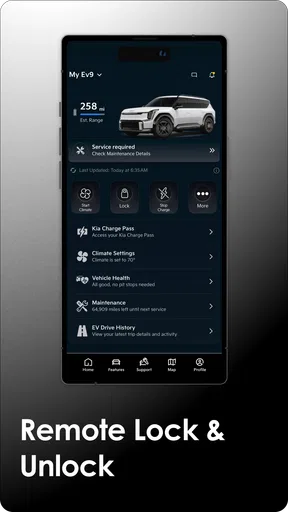
- Remote lock
- unlock
- and start features are convenient for compatible vehicles.
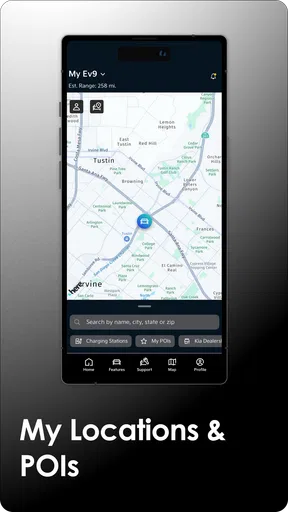
- Vehicle location tools can help you find your Kia in busy parking areas.
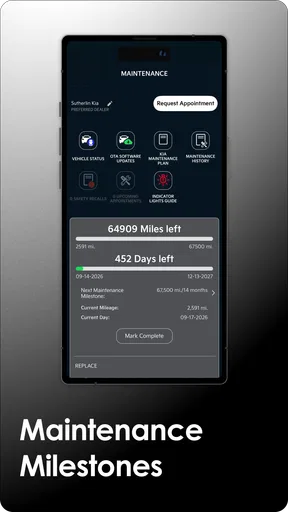
- Maintenance reminders make it easier to keep track of scheduled service.
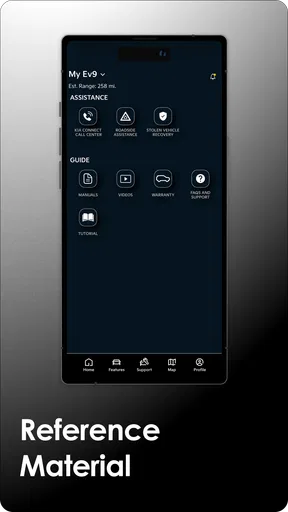
- Digital owner resources provide quick access to manuals and vehicle information.
- Trip and vehicle status details can be useful for monitoring everyday car use.
Cons
- Many remote features require an active Kia Connect subscription.
- Functionality depends on vehicle model
- trim
- and connected-service availability.
- Some commands may respond slowly when cellular coverage is weak.
- The app can use noticeable battery and data while sending vehicle updates.
- Account setup and vehicle verification may take time before features work.
FAQs for Kia Access
What is Kia Access, and what can I use it for?
Kia Access is Kia’s official mobile companion app for compatible vehicles. After signing in and linking your Kia account, you can review vehicle information, check maintenance details, locate your car, request roadside assistance, and, on supported models, remotely lock, unlock, or start the vehicle. The exact tools depend on your Kia model, model year, trim, connected-services package, and region.
Does Kia Access work with every Kia vehicle?
No. Kia Access features are not identical for every vehicle. Some functions may be available only on newer Kia models equipped with Kia Connect, while older vehicles may offer limited information or no remote-control features. Availability can also vary by country and subscription status. Before downloading, check your vehicle’s compatibility using its VIN and confirm that Kia Connect services are supported in your market.
Is Kia Access free to use, or does it require a subscription?
Downloading Kia Access is generally free, but many connected features require an eligible Kia Connect plan, an activated account, and a vehicle with compatible hardware. Kia may provide a trial period with certain new vehicles, after which paid subscription terms can apply. Pricing, trial length, and included features vary by model, purchase date, and region, so review the current terms before relying on remote services.
Can Kia Access remotely start, lock, or unlock my car?
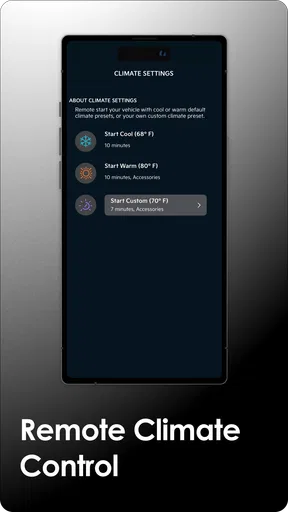
Remote controls may be available through Kia Access, but they are not guaranteed for every Kia. Supported functions can include remote start, door locking or unlocking, climate control, horn and lights, and vehicle status checks. The vehicle must have an active connection and meet safety conditions, such as being in an appropriate gear and having sufficient battery or fuel. Poor cellular coverage can delay or prevent commands.
What should I do if Kia Access cannot connect or a remote command fails?
First, confirm that your phone has a reliable internet connection, you are using the correct Kia account, and the vehicle has coverage and an active Kia Connect subscription. Refresh the vehicle status, close and reopen the app, and install available updates. Remote commands may also fail when the car is underground, the battery is low, or safety requirements are not met. If problems continue, contact Kia customer support or your dealer.


